Updating from Capacitor 8 to Capacitor 9
In this guide, you'll find steps to update your project to the current Capacitor 9 version as well as a list of breaking changes for our official plugins.
This guide covers app-level changes. If you maintain a Capacitor plugin, see Updating plugins to 9.0 instead.
Cordova support is now optional
Capacitor's Cordova compatibility layer is now only included in your app when your project actually has a Cordova plugin installed. Previously, the native Cordova runtime (the capacitor-cordova-android Gradle module and plugins module on Android, and the CapacitorCordova CocoaPods pod / SPM product on iOS) was always bundled into every app, whether or not it used any Cordova plugins.
Running npx cap sync (or update) now detects whether any installed plugin is a Cordova plugin and only wires in the Cordova runtime when one is found. If your project has no Cordova plugins, you'll notice:
- On Android, the generated
settings.gradleand appbuild.gradleno longer include thecapacitor-cordova-android/capacitor-cordova-android-pluginsmodules. - On iOS,
CapacitorCordovais no longer added to yourPodfileorPackage.swift.
There is currently no configuration option to force-include the Cordova runtime when no Cordova plugin is present. If your app's native code (or a plugin you maintain) directly references symbols from Capacitor's Cordova compatibility layer — for example com.getcapacitor.cordova.CordovaPlugin on Android, or anything from the CapacitorCordova pod/product on iOS — without having an actual Cordova plugin installed, those references will fail to resolve after upgrading. Add a Cordova plugin dependency (even a trivial one) if you need the layer present, or remove the direct reference.
Breaking changes in @capacitor/cli
cap run's separate live-reload flags (--live-reload/-l, --host, --port, --https) have been merged into a single --url flag. Instead of:
npx cap run android -l --host 192.168.1.181 --port 5173
pass the full URL your dev server printed (Vite, webpack, etc.) directly:
npx cap run android --url http://192.168.1.181:5173
NodeJS 24+
Capacitor 9 requires NodeJS 24 or greater. (Latest LTS version is recommended.) Node 24 also comes with npm 11 by default, as opposed to npm 10 with Node 22.
Using the CLI to Migrate
Capacitor 9 hasn't reached general availability yet, so install the next version of the Capacitor CLI to your project (once 9.0.0 is generally available, use @latest instead):
npm i -D @capacitor/cli@next
Once installed, simply run the following to have the CLI handle the migration for you.
npx cap migrate
If any of the steps for the migration are not able to be completed, additional information will be made available in the output in the terminal. The steps for doing the migration manually are listed out below.
Whichever path you take, finish with the iOS verification checklist. npx cap migrate rewrites the same entry point files the manual steps do, so a migrated project needs the same checks as a hand-edited one.
Breaking changes in @capacitor/android
androidx.core:core 1.19.0 folds core-ktx into itself, and AGP 9 bundles the Kotlin Gradle Plugin natively while Gradle 9 fully removes jcenter(). These rarely affect an app directly, unless you (or an old/community plugin) still pin an old core-ktx version, apply Kotlin standalone, or reference jcenter() — see Migrate core-ktx to core and Update Kotlin and remove jcenter() below.
Capacitor 9 also removes the Java APIs that were deprecated in previous major versions, most of them used by plugin authors — see Breaking changes in code. If your app has custom native code, check that list too.
Breaking changes in @capacitor/ios
Capacitor 9 boots iOS apps from a SwiftUI App struct instead of a UIKit AppDelegate. Your app project gains App.swift and CapacitorView.swift, the AppDelegate is demoted to a @UIApplicationDelegateAdaptor, your SceneDelegate is emptied out, and Main.storyboard is deleted. Every app needs this change, including apps already on 8.5 — see Adopt the SwiftUI entry point below.
If you're updating from Capacitor 8.4 or earlier, read Updating to 8.5 as well. It covers the iOS UIScene lifecycle that the SwiftUI entry point builds on, and its audit section lists the custom native code patterns that both changes affect.
Capacitor 9 also removes the Swift and Objective-C APIs that were deprecated in previous major versions, most of them used by plugin authors — see Breaking changes in code. If your app has custom native code (for example CAPBridge.handleOpenUrl in your AppDelegate), check that list too.
iOS
The following guide describes how to upgrade your Capacitor 8 iOS project to Capacitor 9.
Upgrade Xcode
Capacitor 9 requires Xcode 27 or newer.
Raise iOS Deployment Target
Capacitor 9 requires iOS 16.0 or greater.
Do the following for your Xcode project: select the Project within the project editor and open the Build Settings tab. Under the Deployment section, change iOS Deployment Target to iOS 16.0. Repeat the same steps for any app Targets.
Then, if the project is using CocoaPods, open ios/App/Podfile and update the iOS version to 16.0:
platform :ios, '16.0'
Adopt the SwiftUI entry point
@main moves out of AppDelegate.swift into a new App.swift, SwiftUI declares the app's scene, and CAPBridgeViewController is hosted inside that scene through a UIViewControllerRepresentable. The UIKit entry point it replaces — Main.storyboard, the UIWindow the AppDelegate owned, and the window setup in your SceneDelegate — is removed.
Swift 6 (bundled with Xcode 27) rejects the deprecated @UIApplicationMain attribute, but don't replace it with @main. In Capacitor 9 @main belongs on the App struct in App.swift. Delete the attribute from AppDelegate instead — an app that declares two entry points doesn't compile.
These are the files that change:
App.swift— new. An@mainstruct conforming toApp. It adopts theAppDelegatethrough@UIApplicationDelegateAdaptorand declares aWindowGroupscene containingCapacitorView().CapacitorView.swift— new. AUIViewControllerRepresentablethat makesCAPBridgeViewControlleravailable to SwiftUI.SceneDelegate.swift— emptied. The class stays, with no methods at all.AppDelegate.swift— demoted. It conforms toNSObjectinstead ofUIResponder, and keepsapplication(_:didFinishLaunchingWithOptions:)andapplication(_:configurationForConnecting:options:). The@mainattribute, thewindowproperty,application(_:open:options:), andapplication(_:continue:restorationHandler:)go.Info.plist—UIApplicationSceneManifestis reduced toUIApplicationSupportsMultipleScenes, because the AppDelegate now builds the scene configuration in code.UIMainStoryboardFileis removed.Base.lproj/Main.storyboard— deleted.LaunchScreen.storyboardstays; iOS still requires a launch storyboard.
App.swift, CapacitorView.swift, SceneDelegate.swift, and AppDelegate.swift are the same files in the SPM and CocoaPods templates, so the steps below apply to both.
What the CLI migrates automatically
For a project that still matches the Capacitor template shape, npx cap migrate applies the whole change: it writes App.swift, CapacitorView.swift, and SceneDelegate.swift, registers all three with the Xcode App target, rewrites AppDelegate.swift, updates Info.plist, and deletes Main.storyboard. Each step is idempotent, so a run that stops part-way is finished by running npx cap migrate again. That also applies to a project migrated before the scene delegate landed: run npx cap migrate again and it adds the missing file and wiring.
The migrator skips the automated rewrite and prints the manual steps instead when your AppDelegate.swift:
- has no
AppDelegateclass; - manages its own
UIWindow, which the SwiftUIAppstruct now owns; - has a custom
application(_:open:options:)orapplication(_:continue:restorationHandler:)body, which scenes no longer call.
Three partial outcomes are worth watching for in the terminal output:
- An
AppDelegate.swiftthat carries code of your own is converted in place rather than replaced with the Capacitor 9 template. Check what it still holds against step 4 below. - A
SceneDelegate.swiftthat carries code of your own is kept rather than emptied, and it is still the app's scene delegate. Move its window setup intoApp.swiftand its URL and activity handling into the SwiftUI scene body, as step 3 describes. - A
UIApplicationSceneManifestthat names a scene delegate class other thanSceneDelegateis left untouched. Follow step 5 once that delegate is ported.
Migrate the entry point by hand
Follow these steps when npx cap migrate skips the rewrite, or when you'd rather apply the change yourself. The starting point is a Capacitor 8.5 project; if you're on 8.4 or earlier, adopt the UIScene lifecycle first.
1. Add App.swift
Create App/App/App.swift. This is the app's new entry point:
import SwiftUI
import Capacitor

@main
struct CapacitorApp: App {
    @UIApplicationDelegateAdaptor(AppDelegate.self) var appDelegate

    var body: some Scene {
        WindowGroup {
            CapacitorView()
                .ignoresSafeArea()
                .onOpenURL { url in
                    SceneDelegateProxy.shared.handle(openURL: url)
                }
                .onContinueUserActivity(NSUserActivityTypeBrowsingWeb) { activity in
                    SceneDelegateProxy.shared.handle(userActivity: activity)
                }
        }
    }
}
@UIApplicationDelegateAdaptor keeps your AppDelegate alive for the app-level callbacks that survive the scene lifecycle, such as push notification registration. .ignoresSafeArea() hands the full window to the WebView, which manages its own insets.
2. Add CapacitorView.swift
Create App/App/CapacitorView.swift. It wraps the bridge view controller so SwiftUI can host it:
import SwiftUI
import Capacitor

public struct CapacitorView: UIViewControllerRepresentable {
    public func makeUIViewController(context: Context) -> CAPBridgeViewController {
        CAPBridgeViewController()
    }

    public func updateUIViewController(_ vc: CAPBridgeViewController, context: Context) {}
}
If your app uses a CAPBridgeViewController subclass, return it from makeUIViewController(context:) instead.
3. Empty out SceneDelegate.swift
App.swift owns the window now, so the scene delegate keeps nothing but its declaration. Replace the body of App/App/SceneDelegate.swift with:
import UIKit

class SceneDelegate: UIResponder, UIWindowSceneDelegate {}
If your project is on Capacitor 8.4 or earlier and has no SceneDelegate.swift, create it with those contents. The class has to exist even though it's empty: application(_:configurationForConnecting:options:) names it as the delegateClass, and UIKit instantiates that type for each scene.
Anything your old SceneDelegate did has a new home. Window creation moves to App.swift — WindowGroup builds the window and CapacitorView supplies the root view controller. URL and universal-link handling moves to the .onOpenURL and .onContinueUserActivity modifiers in App.swift; don't reimplement scene(_:openURLContexts:) or scene(_:continue:) here, because a scene delegate that implements them takes delivery away from those modifiers. Per-scene UIKit APIs that SwiftUI doesn't surface, such as preferredWindowingControlStyle(for:), are what the class is for — add those here.
4. Rework AppDelegate.swift
App.swift now owns the entry point and the window, so the @main attribute and the window property go. application(_:configurationForConnecting:options:) stays: it is what names SceneDelegate as the scene delegate class, and the Info.plist no longer does.
 import UIKit
-import Capacitor

-@main
-class AppDelegate: UIResponder, UIApplicationDelegate {
-
-    var window: UIWindow?
-
+class AppDelegate: NSObject, UIApplicationDelegate {
     func application(_ application: UIApplication, didFinishLaunchingWithOptions launchOptions: [UIApplication.LaunchOptionsKey: Any]?) -> Bool {
         return true
     }

-    func application(_ application: UIApplication,
-                     configurationForConnecting connectingSceneSession: UISceneSession,
-                     options: UIScene.ConnectionOptions) -> UISceneConfiguration {
-        let config = UISceneConfiguration(name: "Default Configuration",
-                                          sessionRole: connectingSceneSession.role)
-        config.delegateClass = SceneDelegate.self
-        return config
-    }
+    func application(
+        _ application: UIApplication,
+        configurationForConnecting connectingSceneSession: UISceneSession,
+        options: UIScene.ConnectionOptions
+    ) -> UISceneConfiguration {
+        let configuration = UISceneConfiguration(name: nil, sessionRole: connectingSceneSession.role)
+        configuration.delegateClass = SceneDelegate.self
+        return configuration
+    }
 }
The name is now nil because step 5 removes the UISceneConfigurations entry that "Default Configuration" referred to. That's the only behavioral change in the method; the rest of the rewrite is the Capacitor 9 template's formatting, so the file you end up with matches a project migrated by npx cap migrate or created fresh. If your project is on Capacitor 8.4 or earlier and has no configurationForConnecting method, add the one above — without it UIKit builds the scene with no delegate of yours and nothing can answer per-scene callbacks.
If your AppDelegate still declares application(_:open:options:) or application(_:continue:restorationHandler:), both are dead code: scenes stopped calling them when you adopted the UIScene lifecycle in 8.5. What to do with each depends on its body:
- If it only returns
ApplicationDelegateProxy.shared.application(...)— the body the pre-8.5 template shipped — delete the method. The SwiftUI scene body forwards to the proxy now. - If you added handling of your own, move it into the
.onOpenURLor.onContinueUserActivityclosure inApp.swiftfirst, then delete the method. See Route URL schemes and universal links.
The pre-8.5 template invited that custom code in a comment above each method, so read the body before deleting it. npx cap migrate skips the automated rewrite when it finds a custom body in either method, for the same reason.
The empty applicationWillResignActive, applicationDidEnterBackground, applicationWillEnterForeground, applicationDidBecomeActive, and applicationWillTerminate stubs that older templates shipped aren't called under the scene lifecycle either. The Capacitor 9 template drops them. If you added code to any of them, move it before you delete the method.
5. Update Info.plist
application(_:configurationForConnecting:options:) builds the scene configuration in code, so the manifest no longer needs to name a configuration, a delegate class, or a storyboard. Reduce it to a single key, and remove UIMainStoryboardFile if your project still sets it:
 <key>UIApplicationSceneManifest</key>
 <dict>
     <key>UIApplicationSupportsMultipleScenes</key>
     <false/>
-    <key>UISceneConfigurations</key>
-    <dict>
-        <key>UIWindowSceneSessionRoleApplication</key>
-        <array>
-            <dict>
-                <key>UISceneConfigurationName</key>
-                <string>Default Configuration</string>
-                <key>UISceneDelegateClassName</key>
-                <string>$(PRODUCT_MODULE_NAME).SceneDelegate</string>
-                <key>UISceneStoryboardFile</key>
-                <string>Main</string>
-            </dict>
-        </array>
-    </dict>
 </dict>
 <key>UILaunchStoryboardName</key>
 <string>LaunchScreen</string>
Leave UILaunchStoryboardName alone. LaunchScreen.storyboard is still required.
6. Delete Main.storyboard
CapacitorView supplies the root view controller, so the main storyboard has nothing left to do. Delete App/App/Base.lproj/Main.storyboard and remove its reference from the App target. Deleting the file through Xcode removes the reference for you; if you edit project.pbxproj by hand, the file needs its PBXFileReference, PBXBuildFile, group entry, and build-phase entry removed.
Leave LaunchScreen.storyboard alone.
7. Register the new files and sync
Add App.swift, CapacitorView.swift, and SceneDelegate.swift to the App target. Xcode does this when you add the files through the IDE. By hand, each file needs a PBXFileReference, a PBXBuildFile, an entry in the App group, and an entry in the target's Sources build phase.
Then run npx cap sync ios.
Route URL schemes and universal links
Custom URL schemes and universal links reach the app through the SwiftUI scene body. .onOpenURL forwards to SceneDelegateProxy.shared.handle(openURL:) and .onContinueUserActivity(NSUserActivityTypeBrowsingWeb) forwards to SceneDelegateProxy.shared.handle(userActivity:), which post the same notifications the AppDelegate and scene delegate paths posted before. Plugins that listen for .capacitorOpenURL or .capacitorOpenUniversalLink keep working, and App.getLaunchUrl() keeps returning the launch URL.
App-specific routing of your own goes in the same place. Code that used to live in AppDelegate.application(_:open:options:), or in SceneDelegate.scene(_:openURLContexts:), belongs in the .onOpenURL closure, alongside the forwarding call:
     var body: some Scene {
         WindowGroup {
             CapacitorView()
                 .ignoresSafeArea()
                 .onOpenURL { url in
+                    MyRouter.handle(url)
                     SceneDelegateProxy.shared.handle(openURL: url)
                 }
                 .onContinueUserActivity(NSUserActivityTypeBrowsingWeb) { activity in
                     SceneDelegateProxy.shared.handle(userActivity: activity)
                 }
         }
     }
Don't put that routing in SceneDelegate instead. A scene delegate that implements scene(_:openURLContexts:) or scene(_:continue:) takes delivery away from the SwiftUI modifiers: .onOpenURL and .onContinueUserActivity stop firing, and links stop reaching the bridge. The Capacitor 9 SceneDelegate is empty for this reason.
Audit your custom native code
Most apps need nothing beyond the steps above. Check your own native code and any custom plugins for these patterns, which npx cap migrate also reports when it finds them:
- A
UIWindowcreated or configured outsideApp.swift. The SwiftUIAppstruct owns the window now. Root view controller customization belongs inCapacitorView, and window-level customization in the scene body. - Custom
application(_:open:options:)orapplication(_:continue:restorationHandler:)bodies. Move them into the SwiftUI scene body as shown above. scene(_:willConnectTo:options:),scene(_:openURLContexts:), orscene(_:continue:)in yourSceneDelegate. Window setup moves toApp.swift, and link handling to the scene body — leaving the URL or activity methods in place breaks the SwiftUI modifiers. Other per-scene UIKit methods can stay.UIApplication.shared.applicationState. Read the window scene'sactivationStateinstead.tmpWindoworTmpViewController. Both were removed in Capacitor 8.5. Use the bridge'sviewControlleras the presentation anchor.
The audit section of the 8.5 guide covers the UIScene side of these in more detail.
Verify the iOS migration
Run through this on a device or simulator after migrating, whether npx cap migrate applied the change or you followed the manual steps.
Every app:
- The project builds on Xcode 27 with no duplicate entry point error.
- The app launches and renders your web app.
- Backgrounding and foregrounding the app fires the JavaScript
pauseandresumeevents.
If your app registers a custom URL scheme:
- A link reaches the app both cold (app killed, then link tapped) and warm (app already running). Check both cases against the
appUrlOpenlistener andApp.getLaunchUrl().
If your app handles universal links:
- An associated-domain link reaches the app and routes to the right screen, both cold and warm. Check the same two surfaces,
appUrlOpenandApp.getLaunchUrl(). Cold start is the case to watch: it arrives through.onContinueUserActivityrather than.onOpenURL, and aSceneDelegatethat still implementsscene(_:continue:)silently takes delivery away from it.
If your app has custom native code:
- The patterns in Audit your custom native code are gone, and anything your old
SceneDelegateorAppDelegatedid still happens.
CocoaPods Trunk is expected to become read-only on December 2, 2026. If you haven't already, consider migrating your app to SPM, which is the default for new Capacitor projects.
Android
The following guide describes how to upgrade your Capacitor 8 Android project to Capacitor 9.
Upgrade Android Studio
Capacitor 9 requires Android Studio 2026.1.1 or newer.
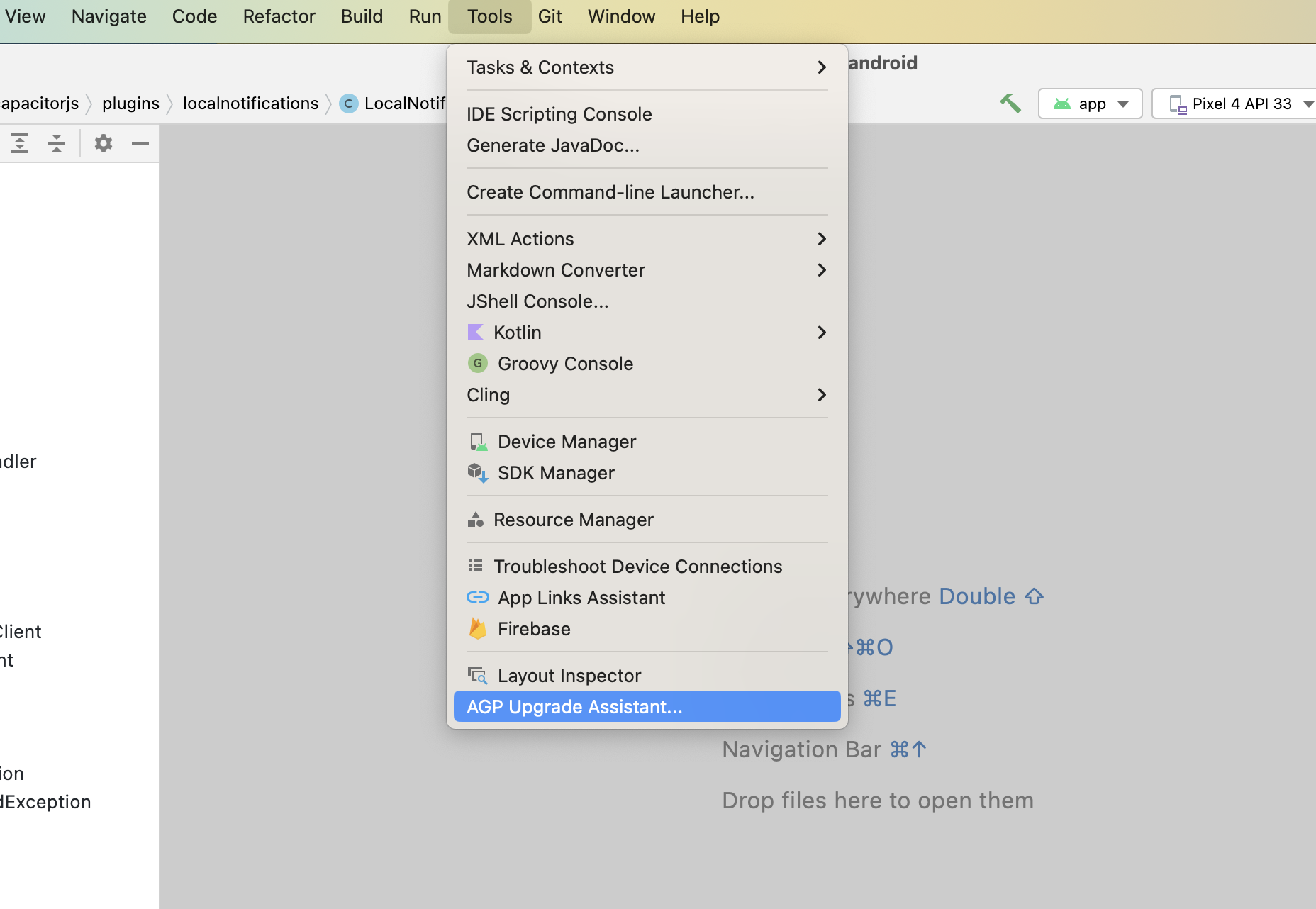
Once it's updated, Android Studio can assist with some of the updates related to gradle. To start, run Tools -> AGP Upgrade Assistant and choose 9.2.1 as the version to update on dropdown. Then click Run selected steps.
Clean up gradle.properties
AGP 9 changed the defaults of several gradle.properties flags, and the AGP Upgrade Assistant writes them back explicitly so your build keeps the AGP 8 behavior. A Capacitor app needs none of them: most are deprecated and will be removed in AGP 10, and a couple actively break a Capacitor 9 build (android.builtInKotlin=false turns off the Kotlin support that AGP 9 now bundles, and android.sdk.defaultTargetSdkToCompileSdkIfUnset=false stops AGP from inferring targetSdkVersion). Remove them:
# gradle.properties

- android.defaults.buildfeatures.resvalues=true
- android.sdk.defaultTargetSdkToCompileSdkIfUnset=false
- android.enableAppCompileTimeRClass=false
- android.usesSdkInManifest.disallowed=false
- android.uniquePackageNames=false
- android.dependency.useConstraints=true
- android.r8.strictFullModeForKeepRules=false
- android.r8.optimizedResourceShrinking=false
- android.builtInKotlin=false
- android.newDsl=false
Update Android Project Variables
In your variables.gradle file, update your values to the following new minimums
minSdkVersion = 26
compileSdkVersion = 37
targetSdkVersion = 37
androidxActivityVersion = '1.13.0'
androidxAppCompatVersion = '1.7.1'
androidxCoordinatorLayoutVersion = '1.3.0'
androidxCoreVersion = '1.19.0'
androidxFragmentVersion = '1.8.9'
coreSplashScreenVersion = '1.2.0'
androidxWebkitVersion = '1.16.0'
junitVersion = '4.13.2'
androidxJunitVersion = '1.3.0'
androidxEspressoCoreVersion = '3.7.0'
cordovaAndroidVersion = '15.0.0'
Remove targetSdkVersion from your app's build.gradle
AGP 9 infers targetSdkVersion from compileSdkVersion when it isn't set explicitly, therefore you can remove it:
defaultConfig {
    applicationId "com.getcapacitor.app"
    minSdkVersion rootProject.ext.minSdkVersion
-   targetSdkVersion rootProject.ext.targetSdkVersion
    versionCode 1
    versionName "1.0"
}
Rename the default ProGuard file
AGP 9 removed proguard-android.txt. In your app/build.gradle, replace it with proguard-android-optimize.txt, which also enables ProGuard optimizations:
buildTypes {
    release {
        minifyEnabled false
-       proguardFiles getDefaultProguardFile('proguard-android.txt'), 'proguard-rules.pro'
+       proguardFiles getDefaultProguardFile('proguard-android-optimize.txt'), 'proguard-rules.pro'
    }
}
Declare dependency versions in your app's build.gradle
Your app/build.gradle references version variables that are declared in the root project's variables.gradle, and relies on Gradle walking up the project hierarchy to resolve them. That implicit lookup is deprecated in Gradle 9.6 and becomes an error in Gradle 10, so declare them explicitly at the top of the file:
apply plugin: 'com.android.application'

+ def androidxAppCompatVersion = rootProject.ext.androidxAppCompatVersion
+ def androidxCoordinatorLayoutVersion = rootProject.ext.androidxCoordinatorLayoutVersion
+ def coreSplashScreenVersion = rootProject.ext.coreSplashScreenVersion
+ def junitVersion = rootProject.ext.junitVersion
+ def androidxJunitVersion = rootProject.ext.androidxJunitVersion
+ def androidxEspressoCoreVersion = rootProject.ext.androidxEspressoCoreVersion

android {
Those are the variables the Capacitor template declares. If your app references any other variable from variables.gradle, for example a dependency version used by a local plugin, declare it here too.
Migrate core-ktx to core
androidx.core:core 1.19.0 merges every extension function previously shipped in core-ktx into core itself, turning core-ktx into an empty compatibility artifact. If your app (or an old/community plugin it depends on) still explicitly depends on core-ktx with a version older than 1.19.0, you may hit a duplicate class error at build time; remove it, or depend on core instead:
dependencies {
-   implementation "androidx.core:core-ktx:1.17.0"
+   implementation "androidx.core:core:1.19.0"
}
Update Kotlin and remove jcenter()
AGP 9 bundles the Kotlin Gradle Plugin natively (Kotlin 2.2.10) instead of requiring it to be applied as a separate plugin. If your build.gradle still applies kotlin-android directly or declares a standalone kotlin-stdlib/kotlin-gradle-plugin dependency, remove them — keeping them alongside AGP 9's built-in Kotlin causes a duplicate-plugin build failure:
buildscript {
    dependencies {
        classpath 'com.android.tools.build:gradle:9.2.1'
-       classpath "org.jetbrains.kotlin:kotlin-gradle-plugin:2.2.20"
    }
}
-apply plugin: 'kotlin-android'

dependencies {
-   implementation "org.jetbrains.kotlin:kotlin-stdlib:2.2.20"
}
Gradle 9 also fully removes the jcenter() repository helper (redirected to Maven Central since 2024). Any build.gradle that still calls it fails at Gradle configuration time:
repositories {
    google()
-   jcenter()
+   mavenCentral()
}
Update google services plugin
# build.gradle

    dependencies {
        classpath 'com.android.tools.build:gradle:9.2.1'
-       classpath 'com.google.gms:google-services:4.4.4'
+       classpath 'com.google.gms:google-services:4.5.0'
Update gradle plugin to 9.2.1
# build.gradle

    dependencies {
-       classpath 'com.android.tools.build:gradle:8.13.0'
+       classpath 'com.android.tools.build:gradle:9.2.1'
Update gradle wrapper to 9.5.1
# gradle-wrapper.properties

distributionBase=GRADLE_USER_HOME
distributionPath=wrapper/dists
- distributionUrl=https\://services.gradle.org/distributions/gradle-8.14.3-all.zip
+ distributionUrl=https\://services.gradle.org/distributions/gradle-9.5.1-all.zip
zipStoreBase=GRADLE_USER_HOME
zipStorePath=wrapper/dists
Plugins
Plugins have been updated to version 9.0.0, make sure to update them to use latest version.
The following plugin functionality has been modified or removed. Update your code accordingly.
Action Sheet
androidxMaterialVersionvariable has been updated to1.14.0.
Barcode Scanner
kotlinxCoroutinesVersionvariable has been updated to1.11.0.
Browser
androidxBrowserVersionvariable has been updated to1.10.0.
Camera
androidxExifInterfaceVersionvariable has been updated to1.4.2.androidxMaterialVersionvariable has been updated to1.14.0.
Geolocation
playServicesLocationVersionvariable has been updated to21.4.0.kotlinxCoroutinesVersionvariable has been updated to1.11.0.
Google Maps
kotlinxCoroutinesVersionvariable has been updated to1.11.0.googleMapsPlayServicesVersionvariable has been updated to20.0.0.googleMapsUtilsVersionvariable has been updated to5.0.0.googleMapsKtxVersionandgoogleMapsUtilsKtxVersionvariables have been updated to6.0.1.
InAppBrowser
androidxBrowserVersionvariable has been updated to1.10.0.
Push Notifications
The deprecated alert presentation option is no longer supported on iOS. Use banner and/or list instead.
Splash Screen
The default value of launchFadeOutDuration on Android has changed from 200 to 0, since the previous default could block UI changes made immediately after SplashScreen.hide(). If your app relies on the previous 200ms fade-out animation, set launchFadeOutDuration: 200 explicitly in your Capacitor config.